
 CADinTools on Facebook
 Features & Examples
 Download version 405.54 Mar-14-2024
 Installation Guide
 Buy CADinTools Macros
 CorelDRAW Tips
 CalcuList for Android
| CADinTools - Macros for CorelDraw | |
|---|---|
 |
 |
INFORMATION
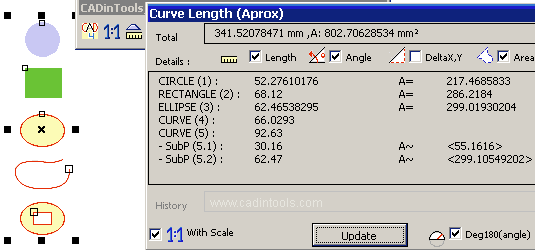
- Total : Show the total length, deltax,y and total area.
- Length, Angle, DeltaX,Y, Area : Information to show.
- Details : Information about known shapes like: circles, ellipses, rectangles (not skewed or distort) and curves (subpaths and information between a range of selected nodes).
- History : The last total.
- Deg180(angle) : if an angle is major to 180 degrees, it reduces 180 degrees.
- Abs(Delta X,Y) : show only absolute DeltaX,Y values (not negatives).
- Update : Update the details with the options selected.
Note1: The measure unit is the actual unit of the active document.
Note2: With Scale (checked = default)
Note3: You can select and copy the Details Box information to another program
like Excel or Quattro Pro.
