
 Features & Examples
 Download version 405.54 Mar-14-2024
 Buy CADinTools Macros
 CorelDRAW Tips
 CADinTools on Facebook
VBA Macros for CorelDraw
 Installation Guide
Installation Guide /
/


CADinTools Toolbar
Software Installation
Step 1 - Software Installation :
- Close CorelDraw or CorelDesigner.
- Run 'Setup_cad4cdr.exe', select the toolbar language (English / Español / Português / Français)
(For software update: Just Install the software, it is not necessary to activate again)
Step 2 - Toolbar Activation :
- Open CorelDRAW or Corel DESIGNER
- Select the menu : Tools>Scrpts>Play... (or Tools>Macros>Play...)
Select 'jm.add_CADtoolBar' and activate the toolbar
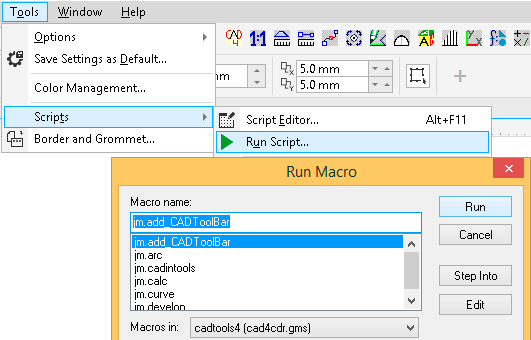
- Repeat Step2 for each Corel application you want to activate the Toolbar.
Step 3 - Finish the Installation :
Try the evaluation software for 30 days, some tools are disabled after the trial period.
Troubleshooting:
VBA is not installed ('Tools>VisualBasic>Play...' is disabled)
- Install again Corel Draw and be sure to enable 'Visual Basic for Applications'.
- Disable your antivirus and personal firewall if you think it is in conflict.
- Some old educational versions of CorelDRAW doesn't include VBA.
The [Import Toolbar] command fails.
- Try the [Create Toolbar] command.
The [Import Toolbar] and [Create Toolbar] commands fail.
The installer can't find any CorelDRAW version.
- Be sure that CorelDRAW is installed on your system.
- If CorelDRAW is installed, copy all files from <Program Files>\CADinTools to <Program Files>\<Corel>\<Corel Draw Graphics Suites XX>\Draw\GMS\
I lost my registration information.
- Goto My Account in your FAQ’s on https://account.mycommerce.com/Home/Faq
Contact Support :
For technical support send a mail to: support.cdr@cadintools.com. Please, report Windows version, Corel Draw/Designer Version, error number or screenshots: [Print Screen] key.
-->