
 CADinTools on Facebook
 Features & Examples
 Download version 405.54 Mar-14-2024
 Installation Guide
 Buy CADinTools Macros
 CorelDRAW Tips
 CalcuList for Android
| CADinTools - Macros for CorelDraw | |
|---|---|
 |
 |
Selection Filter (Main Window)
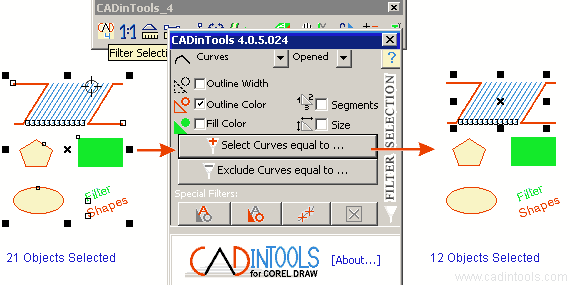
- Properties to Filter :
- Type of Objects:
- All*: Curves, Rectangles, Ellipses, Polygons/Stars and Texts (All other types of objects are not filtered)
- Curves: All the curves, Opened Curves and Closed Curves.
- Rectangles.
- Ellipses: All ellipses, Ellipses, Arcs and Pies.
- Polygons/Stars.
- Texts.
 Outline
Width.
Outline
Width. Outline Color (only UniformFill and NoFill allowed)
 Fill
Color (only UniformFill and NoFill allowed)
Fill
Color (only UniformFill and NoFill allowed)-
 Segments: Number of segments of the curve shapes.
 -
 Size: Width and height.
 - Note: If only the type of object is chosen, only the objects of the chosen type will be filtered. Ex: All rectangles, All opened curves or All Ellipses of type: Arc.
- Type of Objects:
- Select equal to... : After pressing
this button, click on the object which has the properties you want to filter (it can be any object inside or outside of the selection to filter).
Example: Select All* objects with fill color equal to the green rectangle:

- Exclude equal to... : After pressing
this button, click on the object which has the properties you want
to filter (it can be any object inside or outside of the
selection to filter).
Example: Exclude All* objects with fill color equal to the green rectangle:

- Special Filters:
-
 Select Texts : Select only Text Shapes from the actual selection.
 -
 Exclude Texts : Excludes all Text Shapes from the actual selection.
 -
 Select Marks : Select
all "Marks" created with the "Curve edition tool" from the actual selection.
Select Marks : Select
all "Marks" created with the "Curve edition tool" from the actual selection. -
 NoFill,NoBorder: Select all shapes
without color fill and without color border from the actual selection.
NoFill,NoBorder: Select all shapes
without color fill and without color border from the actual selection.
-
- About...: Shows information about the Software and shows the [Buy Now] and [Register Key] Buttons.
